Invoice Processing Automation
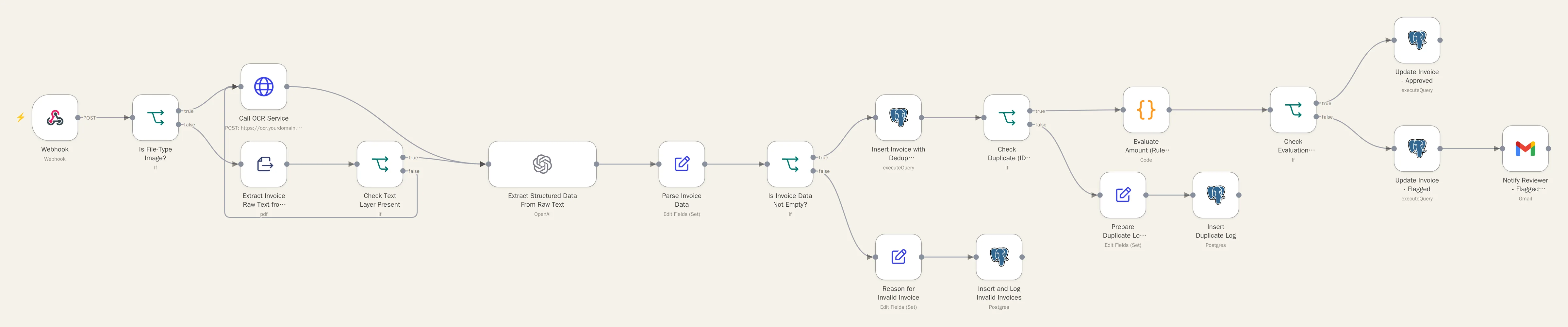
Reads, checks, and files incoming invoices automatically. Clean invoices go straight through; anything questionable gets a person's review before it's paid.
The problem
Invoices are keyed in by hand, checked by eye, and buried in a shared inbox, with no easy record of what came in.
What it does
- Accepts invoices from an upload form, an email forwarding rule, or a shared drive
- Reads PDFs directly and scanned images through OCR
- Extracts vendor, amount, date, and line items
- Checks each amount against the vendor's expected range
- Approves in-range invoices; flags the rest for a person
- Logs every invoice in a searchable database
How it's built
- Main workflow: Invoice Intake, Extraction & Evaluation
- External service: self-hosted OCR (Flask + Tesseract), reached securely through a Cloudflare Tunnel
Pattern: Evaluator-Optimizer
Built to fail safely
Extracted data is validated before it's trusted. Failed checks are retried, never silently passed. Every invoice is logged. Anything uncertain goes to a person.
The outcome
No more hand-keying clean invoices, questionable ones flagged instead of missed, and an instant answer to "how many invoices came in this month, and how many needed review?"