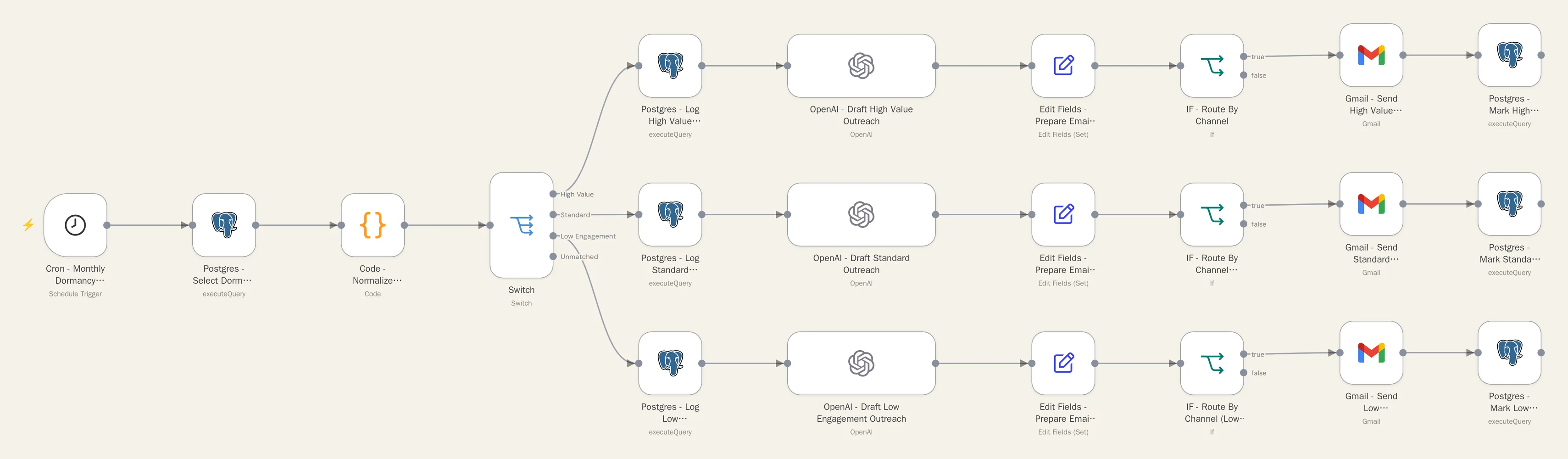
Database Reactivation Automation
Finds contacts who've gone quiet, sends them personalized outreach on a schedule, and sorts the replies, so leads you already paid for don't go to waste.
The problem
Every contact database has a pile of dormant leads and past customers, with no process to bring them back.
What it does
- Finds dormant contacts automatically on a schedule
- Groups them into segments
- Drafts personalized outreach for each segment
- Sorts replies into four categories: interested, soft no, unsubscribe, or needs a person
- Routes each reply to the right next step
How it's built
- Stage 1: Dormant Contact Detection & Segmentation (scheduled)
- Stage 2: Personalized Outreach Drafting & Sending
- Stage 3: Reply Classification & Routing
Built to fail safely
Campaigns are matched by stable IDs, not timestamps, after testing showed timestamps lose precision in transit. Ambiguous replies go to a person instead of being auto-handled.
The outcome
Dormant contacts get systematic follow-up instead of being forgotten, and interested replies land back with your team without anyone watching the inbox.